Getting Started with Legend Roller
By Arthur D Masters & Tia
Welcome, adventurer! Whether you're a seasoned Dungeon Master or a fresh-faced player embarking on your first campaign, the Legend Roller is engineered to enhance your tabletop gameplay experience.
Introduction
Legend Roller is available on both Android and iOS, bringing the sacred ritual of dice rolling into the digital age while maintaining the excitement and randomness that makes tabletop gaming magical. Built by adventurers who understand the chaos of epic campaigns, our app streamlines dice rolls with intuitive modes and customizable options.
Choose Your Path: Roles & Modes
The app features three distinct modes tailored to different gameplay needs:
Player Mode: Hero of the Realm
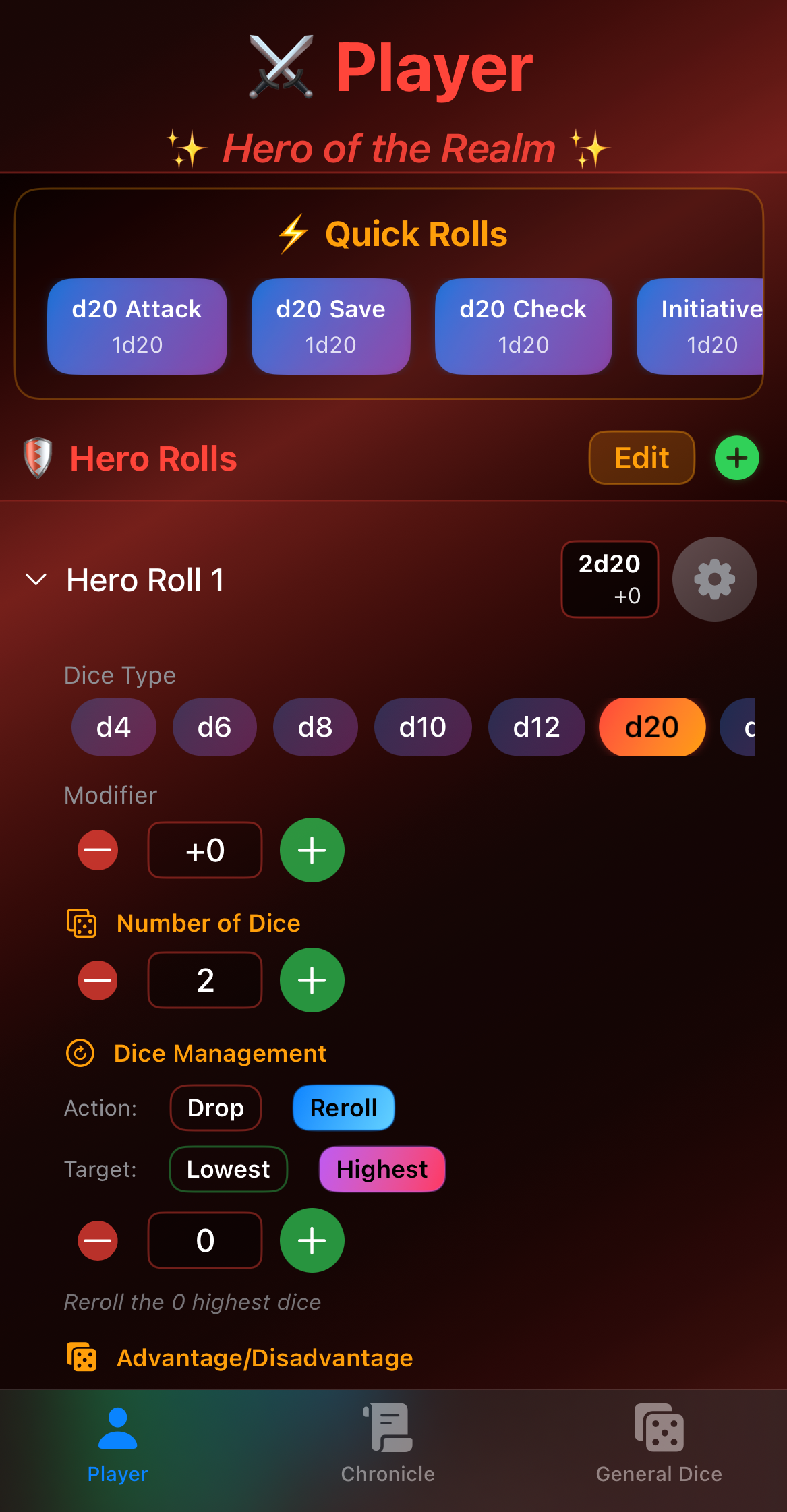
Embark as the "Hero of the Realm" with a bold red theme designed for heroic dice settings. This mode is optimized for players who need quick access to their character's most common rolls - attacks, saves, and skill checks.
Key Features:
- Quick access to character-specific rolls
- Customizable attack and damage macros
- Streamlined interface for fast gameplay
- Red theme for heroic aesthetics
Dungeon Master Mode: Weaver of Fates
Assume the "Weaver of Fates" role with a mystical purple theme tailored for master storytelling. DM Mode provides advanced features for running complex encounters and managing multiple rolls simultaneously.
Key Features:
- Monster roll templates
- Multi-target rolling capabilities
- Advanced modifier management
- Purple theme for commanding presence
General Dice Roller
Need to quickly settle a dispute or make a simple roll? The General Dice Roller provides instant access to basic dice rolls without detailed configurations.
Dice Types at Your Command
The Legend Roller supports all standard DnD dice types:
- d4: The pyramid of fate
- d6: The classic cube
- d8: The octahedron of destiny
- d10: For percentiles and tens
- d12: The dodecahedron of power
- d20: The icosahedron of legend
- d100: For the grandest of chances
Customization Features
Modifiers
Apply both global modifiers (affecting all rolls) and per-die modifiers to customize your roll outcomes. Perfect for applying:
- Ability score bonuses
- Proficiency bonuses
- Situational advantages
- Magic item bonuses
Dice Management: Drop/Keep Logic
Implement sophisticated drop/keep logic by discarding low or high rolls. This is essential for:
- Advantage/Disadvantage (roll 2d20, keep highest/lowest)
- Great Weapon Fighting (reroll 1s and 2s)
- Custom house rules
User Interface Components
Main Interface
The main screen facilitates quick dice configurations with an intuitive layout. Tap to select dice types, adjust quantities, and apply modifiers in seconds.
Advanced Options
Dive deeper with advanced settings for each dice type:
- Set custom ranges
- Configure exploding dice
- Enable critical hit auto-calculation
- Customize sound effects and haptic feedback
Logs & History
Never lose track of an important roll. The comprehensive history system tracks:
- All previous rolls with timestamps
- Roll breakdowns showing individual die results
- Modifiers applied
- Final totals
- Roll context and notes
Quick Rolls: Your Secret Weapon
Configure quick rolls for recurrent actions to speed up gameplay dramatically. Set up macros for:
- Common attack rolls
- Frequently used spells
- Saving throws
- Skill checks
- Custom homebrew mechanics
Pro Tips for Maximum Efficiency
- Prepare Your Macros: Before your session, set up quick rolls for your character's most common actions
- Use Role Switching: Switch between Player and DM mode mid-session when needed
- Label Your Rolls: Add custom names to your rolls for easy identification
- Review History: Use the log feature to verify past rolls and catch errors
- Customize Sounds: Enable or disable sound effects based on your gaming environment
Getting Support
For questions, feedback, or support:
- Email: info@dnddiceroller.com
- Visit: https://dnddiceroller.com
Let the games begin! May your rolls be ever in your favor.
Article based on Legend Roller User Guide and documentation © 2026 Iron Code Studios