Customizing Your Dice Rolling Experience
By Arthur D Masters & Tia
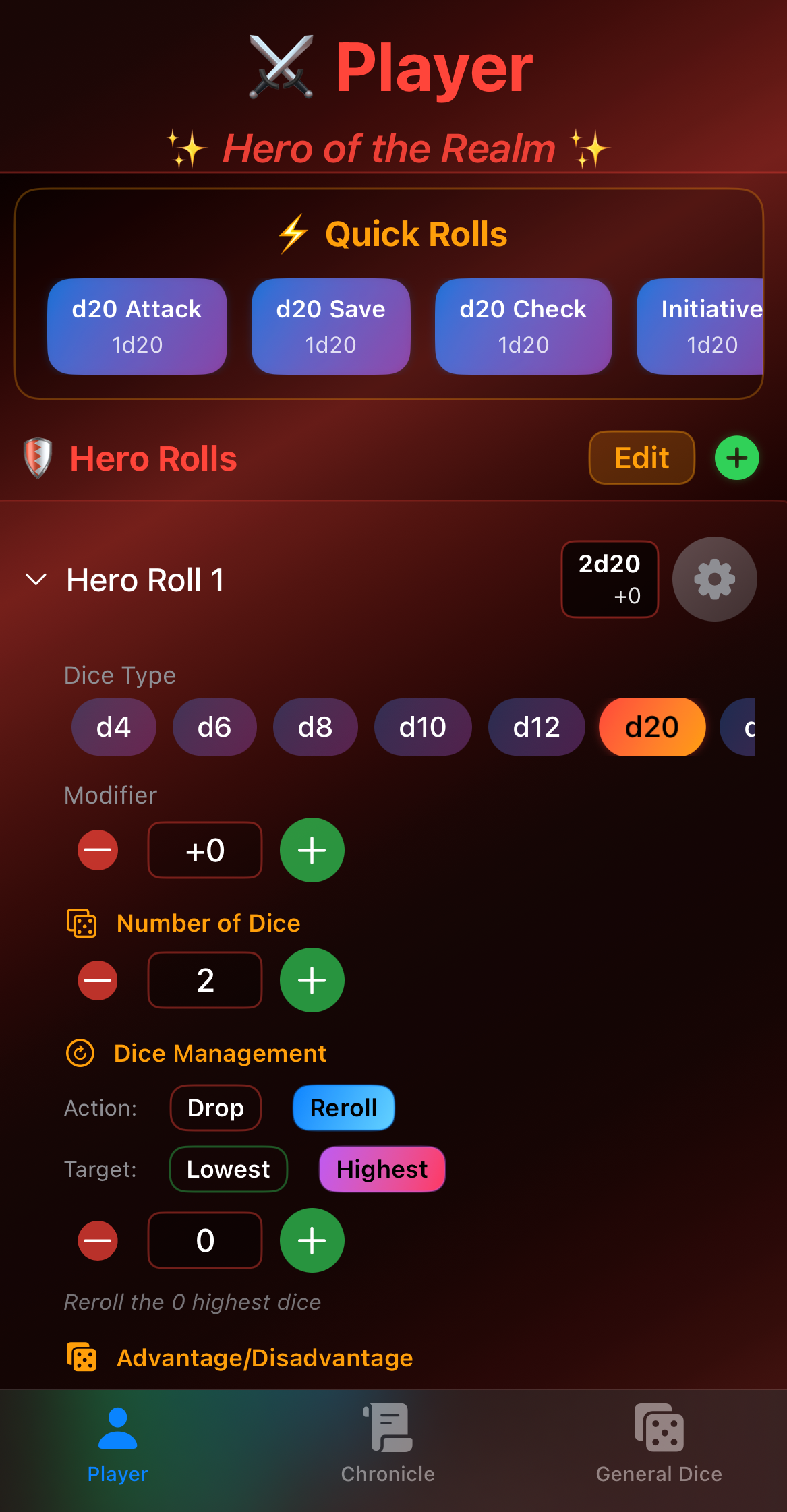
The Legend Roller isn't just a basic random number generator—it's a fully customizable dice rolling platform designed to adapt to your specific playstyle, campaign needs, and house rules. Let's explore how to make it truly yours.
The Philosophy of Customization
Every gaming group is different. Every character is unique. Every DM has their own style. That's why Legend Roller was built from the ground up to be flexible and adaptable.
Whether you're running a by-the-book official adventure or a heavily homebrewed custom campaign, these customization options ensure the dice roller fits your game—not the other way around.
Modifier Management
Global Modifiers
Global modifiers affect every roll you make, perfect for temporary buffs or persistent character features.
Common Uses:
- Bless spell (+1d4 to all rolls)
- Magic weapon bonuses
- Bard's Bardic Inspiration
- Persistent magical effects
How to Apply:
- Set the global modifier value
- Choose which roll types it affects (attacks, saves, checks)
- Enable or disable as needed
- Clear when the effect ends
Pro Tip: Label your global modifier with the effect name so you don't forget what it's for!
Per-Die Modifiers
More granular control for specific situations:
Attack Roll Modifiers:
- Strength/Dexterity bonus
- Proficiency bonus
- Magic weapon enhancement
- Situational bonuses
Damage Roll Modifiers:
- Ability score bonus
- Rage damage (Barbarians)
- Sneak attack (Rogues)
- Smite damage (Paladins)
Saving Throw Modifiers:
- Ability score bonus
- Proficiency bonus
- Magic item bonuses
- Cover bonuses
Conditional Modifiers
Set up different modifier profiles for different situations:
"Standard Attack":
- +5 (STR) +3 (proficiency) = +8 total
"Blessed Attack":
- +5 (STR) +3 (proficiency) +1d4 (Bless) = +8+1d4
"Flanking Attack":
- +5 (STR) +3 (proficiency) with Advantage
"Reckless Attack":
- +5 (STR) +3 (proficiency) with Advantage (and give enemies advantage against you)
Drop/Keep Logic: Advanced Dice Mechanics
The drop/keep system is incredibly powerful for implementing various DnD mechanics:
Advantage/Disadvantage
The most common use:
- Advantage: Roll 2d20, keep highest (2d20kh1)
- Disadvantage: Roll 2d20, keep lowest (2d20kl1)
Elven Accuracy
A racial feat that affects advantage:
- Super Advantage: Roll 3d20, keep highest (3d20kh1)
- Only works on attacks using DEX, INT, WIS, or CHA
Great Weapon Fighting
Fighting style that lets you reroll 1s and 2s on damage:
- Roll damage normally
- If you get 1 or 2, reroll that die
- Take second result (even if worse)
Note: Digital implementation might auto-handle this
Ability Score Generation
The classic "4d6 drop lowest":
- Roll 4d6
- Drop the lowest die (4d6dl1)
- Add the remaining three
- Repeat six times for your six ability scores
Halfling Luck
Reroll 1s on the d20:
- When you roll a 1, reroll
- Must take the new result
- Works on attack rolls, ability checks, and saving throws
Shield Master
Add your shield's AC bonus to DEX saves:
- Configure a special "DEX Save with Shield" quick roll
- Include your normal DEX bonus + shield bonus
Sound and Haptic Feedback
Sound Customization
The right sound can enhance immersion:
Options to Consider:
- Enable/disable roll sounds
- Volume control
- Different sounds for different dice
- Critical hit sounds
- Critical fail sounds
- Custom sound uploads (if supported)
When to Use Sound:
- In-person games (if not distracting)
- Online games with push-to-talk
- Solo play for immersion
- When you want extra feedback
When to Mute:
- Open mic online games
- Public spaces
- Games at odd hours
- When it annoys your table
Haptic Feedback
Feel the dice in your hands:
Vibration Patterns:
- Different intensity for different dice
- Special patterns for crits/fumbles
- Short, medium, or long vibrations
- Custom patterns for different roll types
Battery Considerations:
- Haptic feedback uses more battery
- Consider disabling for long sessions
- Leave enabled for important rolls only
Visual Customization
Theme Options
Make the app match your character or campaign:
Player Mode Themes:
- Default Red (Heroic)
- Custom colors for your character
- Class-based color schemes
- Campaign-specific themes
DM Mode Themes:
- Default Purple (Mystical)
- Darker themes for dramatic campaigns
- Lighter themes for comedic games
- Custom themes for specific arcs
Display Preferences
Number Size:
- Larger numbers for visibility
- Smaller numbers for more information on screen
- Accessibility options for vision impairment
Animation Speed:
- Fast rolls for efficiency
- Slow rolls for drama
- Instant results (no animation)
- Custom timing
History Display:
- Show last 10, 20, or 50 rolls
- Color-coding for success/failure
- Detailed breakdowns vs summary only
- Timestamps on/off
Interface Layout
Customize Your Workspace
Dice Arrangement:
- Most-used dice at the top
- Alphabetical order
- Order by dice size
- Custom arrangement
Button Sizes:
- Larger buttons for accuracy
- Smaller buttons for more options on screen
- Accessibility mode for motor impairment
Information Density:
- Minimal (just essential info)
- Standard (balanced)
- Detailed (all available information)
Label System
Organizing Your Rolls
Good labeling makes everything easier:
Roll Naming:
- Use descriptive names: "Longsword +1 vs AC"
- Include relevant info: "Fireball (5th level)"
- Add emojis for visual cues: "Main Attack"
- Keep it concise but clear
Category Tags:
- Combat rolls
- Skill checks
- Saving throws
- Spell attacks
- Utility rolls
Color Coding:
- Red for attacks
- Blue for checks
- Green for saves
- Purple for spells
- Yellow for utility
Advanced Features
Dice Notation
Understanding dice notation unlocks powerful options:
Basic:
- 1d20 = one twenty-sided die
- 2d6 = two six-sided dice
- 3d8+5 = three eight-sided dice, add 5
Advanced:
- 2d20kh1 = roll 2d20, keep highest
- 4d6dl1 = roll 4d6, drop lowest
- 1d6! = roll 1d6, exploding
- (1d4+1d6)*2 = complex math
Legend Roller Support: Check which notation your version supports and use it to create powerful custom rolls.
Roll History Analysis
Use your history for more than just reference:
Statistics:
- Average roll over session
- Critical hit frequency
- Most/least rolled numbers
- Success rate tracking
Session Insights:
- Which attacks hit most often
- Which saves you fail frequently
- Lucky or unlucky patterns
- Dice "temperature" (hot/cold streaks)
Export and Backup
Protect your configuration:
What to Backup:
- Quick roll configurations
- Custom modifiers
- Theme settings
- Layout preferences
When to Backup:
- Before major updates
- After significant customization
- When starting a new campaign
- Regularly for safety
Group Settings
Shared Configurations
Playing in a consistent group?
Party Presets:
- Share quick roll templates
- Standardized house rules
- Consistent modifier applications
- Coordinated themes for fun
Campaign-Specific:
- Save settings per campaign
- Different configurations for different games
- Archive old campaign settings
- Quick switching between active campaigns
Accessibility Options
Making the App Work for Everyone
Visual Accessibility:
- High contrast mode
- Colorblind-friendly palettes
- Adjustable font sizes
- Screen reader support
Motor Accessibility:
- Larger touch targets
- Simplified gestures
- Voice control (if supported)
- Reduced motion options
Cognitive Accessibility:
- Simplified interface mode
- Step-by-step wizards
- Clear labeling
- Helpful tooltips
Pro Customization Workflow
Here's a complete setup process:
1. Basic Configuration (5 minutes)
- Choose your mode (Player/DM)
- Set your theme
- Configure sound/haptic
2. Roll Setup (10 minutes)
- Create essential quick rolls
- Set up modifiers
- Configure drop/keep rules
3. Organization (5 minutes)
- Name everything clearly
- Arrange for efficiency
- Test your setup
4. Fine-Tuning (ongoing)
- Adjust as you play
- Add new rolls as needed
- Remove unused configurations
- Optimize for your playstyle
Common Customization Mistakes
Avoid These Pitfalls:
- Over-Customization: Don't spend more time configuring than playing
- Under-Labeling: Future you will forget what "Roll 3" means
- Ignoring Updates: Keep your modifiers current with character changes
- No Backups: Don't lose hours of configuration to a lost device
- Too Many Options: Focus on what you actually use
Conclusion
Customization transforms the Legend Roller from a simple tool into your personal gaming companion. By tailoring modifiers, organizing your rolls, and adjusting the interface to your preferences, you create a dice rolling experience that's uniquely yours.
Start simple, experiment freely, and don't be afraid to change things up. The perfect configuration is the one that helps you focus on the game, not the mechanics.
Now get out there and roll some dice—your way.
Article based on Legend Roller User Guide © 2026 Iron Code Studios